TDM opt-out in PDF: making the text and data mining reservation machine-readable with TDMRep
A publisher puts reading samples, catalogues and journal articles on its website as PDFs. The robots.txt tells AI crawlers to stay out. That governs retrieval from this one website, for crawlers that play along. Nothing more. The moment someone forwards the file by email, a retailer posts it on their own site or an archive mirrors it, the robots.txt is out of the picture. The PDF is still there, and there is nothing in it.
The text and data mining opt-out is the lever here: EU copyright law allows mining of exactly such files unless the rightsholder has declared a machine-readable reservation. Where that opt-out goes inside a PDF is something no legal commentary explains. That is what this article is about: the legal situation first, then the technology, and at the end a free pdfToolbox profile that sets and checks the reservation.
The legal situation in three paragraphs
Article 4 of Directive (EU) 2019/790 permits reproductions of lawfully accessible works for text and data mining, the automated analysis of large bodies of text from which a language model learns. The permission does not apply where the rightsholder has expressly reserved the use in an appropriate manner. For content made available online, appropriate means machine-readable. Article 3 contains a separate exception for research that cannot be switched off by a reservation.
Every EU member state has transposed this. In Germany it is Section 44b of the Copyright Act (UrhG), in force since June 2021, with the same structure: mining is allowed, a reservation ends that, and for online works the reservation has to be machine-readable. The UK, by contrast, still has no commercial TDM exception, so a reservation is not needed there. For anything that circulates in the EU, it is.
Since August 2025 there is a third layer. Article 53(1)(c) of the AI Act, Regulation (EU) 2024/1689, obliges providers of general-purpose AI models to identify and comply with reservations of rights under Article 4(3) of the Directive, using state-of-the-art technologies. This applies to providers outside the EU as soon as they offer their model here. The opt-out is no longer only a position under copyright law. It is something an AI provider has to demonstrably take into account.
What machine-readable means and why a line in the imprint is not enough
The law does not define machine-readable. In the LAION case, the Hamburg Regional Court (judgment of 27 September 2024, 310 O 227/23) left open whether a plain-language reservation is machine-readable and hinted that modern language models might understand it. The Hamburg Higher Regional Court dismissed the appeal on 10 December 2025 (5 U 104/24) and did not accept the plain-language reservation in the stock agency's terms as machine-readable: a reservation must be capable of being captured, interpreted and followed by automated means. The case is now before the Federal Court of Justice (I ZR 281/25, heard on 3 September 2026), and a referral to the CJEU is considered likely. So nothing is settled, and for a PDF it does not help anyway. The imprint is on the website. The terms and conditions are on the website. The PDF leaves the website.
In practice, machine-readable means: in a place a crawler looks, in a format it evaluates without interpretation. For websites that is robots.txt and HTTP headers. For a file that gets passed on, it can only be something inside the file itself. A notice on page 2 of the PDF is readable for a human. For a crawler it is body text between other body text.
This is exactly what TDMRep is for.
TDMRep: the opt-out inside the PDF
TDMRep stands for Text and Data Mining Reservation Protocol. It comes from the TDM Reservation Protocol Community Group at the W3C, published as a Final Community Group Report on 10 May 2024. EDRLab led the work, the discussion continues on GitHub. Not an ISO standard, not a W3C standard in the strict sense, but the only widely used way to write the reservation into the file itself. The initiative came from book and journal publishing, the protocol is not limited to it: it works for every PDF a company sends out, from the product catalogue to the price list to the invoice.
TDMRep turns the law into two fields:
tdm-reservation: 1 means rights are reserved. 0 means they are not. Anything else counts as not set.tdm-policy: a URL that explains how to obtain a licence. Optional, but without it a crawler only knows that it may not, not whom to ask.
That is all. No DRM, no encryption, no watermark. Two values a crawler can read.
The spec describes several ways to deliver the two values: a /.well-known/tdmrep.json file on the server, HTTP headers, meta tags in HTML, metadata in EPUB and XMP in PDF. The server file and the headers stay on the server. The meta tag, the EPUB metadata and the XMP travel with their file. For a PDF that gets passed on, only the XMP counts. The spec also settles precedence: what is in the PDF overrides anything the server says about it.
The XMP block
In a PDF the two values live in the XMP metadata of the document, not in the metadata of individual pages or images. The namespace is http://www.w3.org/ns/tdmrep/ with the prefix tdm. This is what the block looks like:
<rdf:Description rdf:about=""
  xmlns:tdm="http://www.w3.org/ns/tdmrep/">
  <tdm:reservation>1</tdm:reservation>
  <tdm:policy>https://publisher.example/policies/tdm.json</tdm:policy>
</rdf:Description>
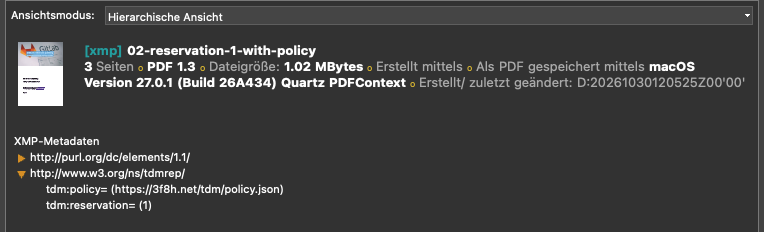
The values apply to all pages and all resources of the file. The PDF Association explicitly recommends keeping TDMRep in the document XMP only and removing it from other XMP streams (images, forms, embedded files). Otherwise a crawler sees two statements and has to pick one.
The policy file
tdm-policy points to a file that describes the conditions under which mining would be allowed. Human-readable as HTML, or machine-readable as JSON-LD following an ODRL profile described in section 7 of the spec. A minimal example that says: ask first, here is the address.
{
  "@context": [
    "http://www.w3.org/ns/odrl.jsonld",
    "http://www.w3.org/ns/tdmrep.jsonld"
  ],
  "@type": "Offer",
  "profile": "http://www.w3.org/ns/tdmrep",
  "uid": "https://publisher.example/policies/1",
  "assigner": {
    "uid": "https://publisher.example",
    "vcard:fn": "Example Publishing Ltd",
    "vcard:hasEmail": "mailto:licensing@publisher.example",
    "vcard:hasURL": "https://publisher.example/tdm-licensing"
  },
  "permission": [{
    "action": "tdm:mine",
    "duty": [{ "action": "obtainConsent" }]
  }]
}
The file sits on your own server, with content type application/ld+json. The URL never changes again, because it ends up in every PDF you deliver. This is the part to decide calmly before the first rollout: domain, path, who receives the enquiries.
PDF/A
This is where it matters for publishers with archiving obligations. The W3C spec notes that PDF/A validators report errors on TDMRep properties. That is only half true. PDF/A requires an extension schema in the metadata for every XMP property outside the predefined schemas. If it is missing, the validator complains. If it is there, the validator is satisfied on this point. The schema does not cure any other PDF/A defects. The PDF Association provides exactly this extension schema as a template, for PDF/A-1, -2 and -3.
A reservation in a PDF/A-2b is therefore doable. You just have to add both: the two values and the schema. Set only the values and you end up with a PDF that says all the right things and no longer passes preflight. PDF/A-4 drops the extension schema requirement, there the two values are enough.
Encryption and embedded files
Two things that come up more often in production than in the W3C spec, whether that is prepress, catalogue generation or invoice output. First, encrypted documents. If the XMP metadata is encrypted along with the rest, no crawler can read the reservation. The PDF Association advises leaving the document XMP unencrypted. Second, embedded files. In the PDF Association's reading, the reservation in the document XMP covers them. But the moment someone extracts the embedded PDF, it is gone. Embedded documents should therefore carry their own tdm block.
What TDMRep cannot do
It is a sign, not a fence. A crawler that does not care reads the file anyway. The difference comes afterwards: without a reservation, the operator can rely on the TDM exception, provided the other conditions are met, above all lawful access. With an effective reservation it cannot, and under the AI Act it must be able to show that it respects such reservations. Whether the use is permitted on other grounds, for instance under the research exception, is a separate question, and one for lawyers, not for prepress. What prepress can deliver: the file as shipped, with its metadata, and when it went out.
Second point: the values do not survive every process. An export from a DAM, a re-render in a web-to-print system, a “reduce file size” in some online tool, and the XMP is rewritten. Set the reservation once and never check again, and a year later you no longer know which files still carry it.
Registries are starting to appear on top of this: EDRLab presented Amlet in November 2026, a register that indexes rights declarations for publishers’ catalogues. A register depends on correctly tagged files. It does not replace them.
Checking and fixing with pdfToolbox
The task is actually small: set an XMP property, check an XMP property. pdfToolbox from callas software does both. The setup for a publisher with ongoing production, as packaged in the download below:
- A fixup that sets
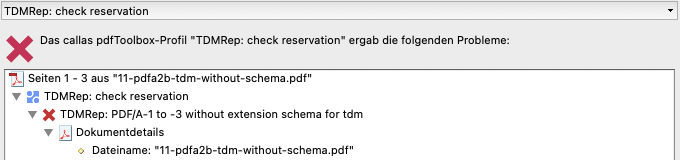
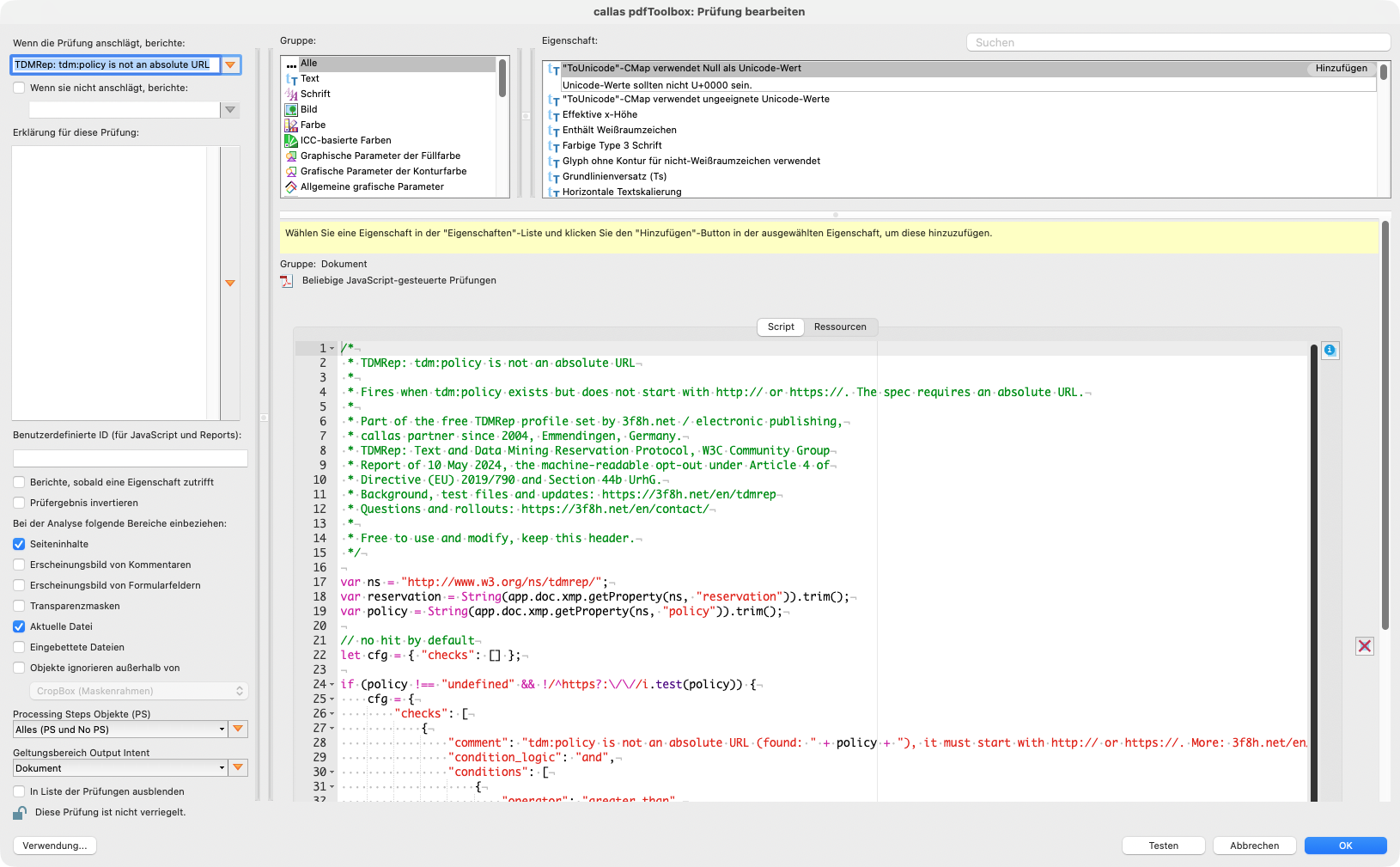
tdm:reservationto 1 and fillstdm:policywith the policy URL. The URL comes from a variable, so the same kfpx works for several imprints or domains. With “embedded files” enabled, attachments receive their own reservation, tested. - A check profile with seven checks: reservation missing, value invalid, value 0, policy missing, policy not an absolute URL, document encrypted, PDF/A-1 to -3 without extension schema. The checks are built as JavaScript-controlled checks, because that is the only clean way to express “property missing”. Runs over every output folder and reports every file that does not say what it should. The checks do not look inside embedded PDFs, extract those and run them separately.
- A process plan: fixup first, then the check profile as acceptance.
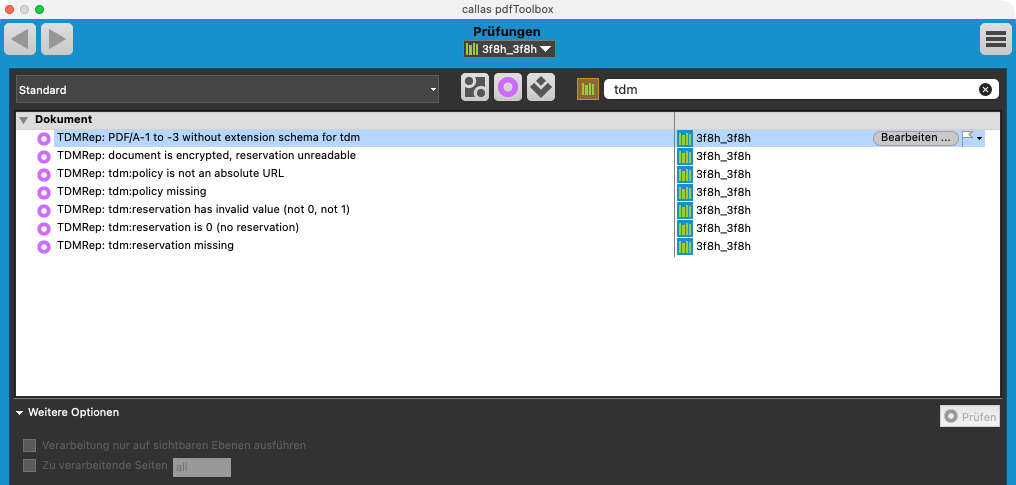
In pdfToolbox Server that hangs off a hot folder, in Enfocus Switch off the pdfToolbox element, in n8n off our callas pdfToolbox REST node for n8n. Everything that leaves the building as a PDF passes through once.
No pdfToolbox in house, or no appetite for going through the archive yourself? We take over analysis, report and correction, once for the backlist or continuously for ongoing output. Which tool does the work is secondary: pdfToolbox, a script, or whatever already runs on your side. On your systems or on ours, in a German data centre. A short email is enough.
What pdfToolbox cannot do for PDF/A
For PDF/A-1 to -3 one piece is missing, and you should know it before switching on the hot folder. The fixup writes the two values. It does not write the extension schema, and no other fixup in pdfToolbox 16 does: “Make document XMP metadata PDF/A-2 compliant” leaves the tdm values in place and adds no schema, and the PDF/A conversion removes the values as non-compliant. Both tested, both reproducible. A fixup that generates extension schemas for foreign namespaces has been filed with callas as a feature request. For single files, the free Acrobat plug-in from Mapsoft writes the schema, but only on Windows and not in server operation.
Until then, the order for PDF/A-1 to -3 is: convert to PDF/A first, then the fixup, then the extension schema from the PDF Association template into the XMP, then PDF/A validation and the check profile as acceptance. For the schema we have a script-based solution that we use ourselves until callas ships the fixup. If you need it, just ask. Run the fixup before the conversion and you get a valid PDF/A without a reservation. Skip the schema and you get a reservation inside a PDF/A that no longer validates. Check 7 in the profile catches exactly that case. For PDF/A-4 none of this applies, the two values are enough.
To check a single PDF without a profile: Acrobat shows the raw XMP in the document properties under “Additional Metadata”. If you prefer scripting: app.doc.xmp.getProperty("http://www.w3.org/ns/tdmrep/", "reservation") reads the value through the pdfToolbox JavaScript API and returns undefined if it is missing. The comparison against 1 and the message are then the actual check.
Fixups for download
Check profile and fixup are available here as kfpx for download, no registration, together with a policy template and the 14 test files everything was verified against. Tested on regular PDFs, PDF/A-2b and PDF/A-4. Enter the policy URL as a variable, import into the library, run it against your own files.
Download: 3f8h-tdmrep-pdftoolbox-v1.0.zip (14 MB, version 1.0, November 2026, for pdfToolbox 16 and later)
If the rollout spans several systems, imprints or an existing Switch setup, or if the PDF/A variant gets stuck in your own preflight: 3f8h.net / electronic publishing has been building workflows with callas pdfToolbox since 2004. Get in touch.
Updates on the profile
Frequently asked questions about the TDM opt-out in PDF
What is a text and data mining opt-out?
Under Article 4 of the EU Copyright Directive 2019/790, text and data mining of lawfully accessible works is permitted, including for commercial purposes and for training AI models, unless the rightsholder has reserved the use. For content available online, that reservation only counts if it is machine-readable. The opt-out is this reservation. In Germany it is implemented in Section 44b UrhG.
Is a notice in the terms and conditions or in the imprint enough?
For the website, perhaps: in 2025 the Hamburg Higher Regional Court did not accept a plain-language reservation in terms and conditions as machine-readable in the LAION case, and the appeal to the Federal Court of Justice is pending. For a PDF, no, because the PDF leaves the website and does not take the terms with it. A reservation that is meant to travel with the file has to be inside the file, in a place a crawler evaluates without interpretation. That is the XMP metadata, following the TDMRep protocol.
How do I check whether my PDF contains the reservation?
In Acrobat via File, Properties, Description, Additional Metadata: that shows the raw XMP, and it must contain an element tdm:reservation with the value 1. For more than a handful of files, use a pdfToolbox check on custom XMP properties that reports every file without a reservation. The profile for that is available for download above.
Does this also work with PDF/A?
Yes, with one extra condition. PDF/A-1 to PDF/A-3 require an XMP extension schema in the metadata for the TDMRep properties, otherwise validation fails. The PDF Association provides a template. pdfToolbox does not currently write this schema, it has to go into the XMP separately, a feature request with callas is pending. PDF/A-4 no longer needs the schema.
What happens if an AI provider ignores the reservation?
The reservation prevents nothing technically. It removes the provider's ability to rely on the TDM exception, and since August 2025 Article 53 of the AI Act requires providers of general-purpose AI models to identify and comply with such reservations using state-of-the-art technologies. What follows from that in a specific case is a question for lawyers. Prepress makes sure the reservation is in the file and documents when the file was delivered.
Sources
- Directive (EU) 2019/790, Articles 3 and 4
- Regulation (EU) 2024/1689 (AI Act), Article 53
- Hamburg Regional Court, judgment of 27 September 2024, 310 O 227/23 (Kneschke v. LAION)
- Hamburg Higher Regional Court, judgment of 10 December 2025, 5 U 104/24, press release
- Federal Court of Justice, I ZR 281/25, hearing on 3 September 2026, press release
- Section 44b UrhG, English translation
- TDM Reservation Protocol, Final Community Group Report
- W3C TDMRep Community Group
- EDRLab: TDMRep
- PDF Association: Using TDMRep to license AI mining of PDFs
- PDF Association: XMP Extension Schema Templates
- PDF Association: PDF/A-1a example with TDMRep